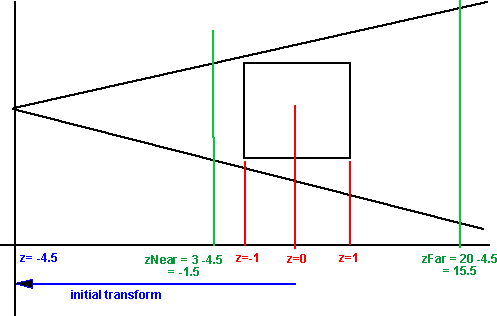
Rendering Pipeline
Usually when working with openGL object coordinates are represented by a 4 dimensional vector where the 4th number is always 1:
A general transformation to include both rotation and translation can then be represented using a 4x4 matrix as described on this page:
| r00 |
r01 |
r02 |
t0 |
| r10 |
r11 |
r12 |
t1 |
| r20 |
r21 |
r22 |
t2 |
| 0 |
0 |
0 |
1 |
Where: rij represents the rotation terms and ti represents the translation
However, once the objects coordinates have been calculated, we then need to project the result onto a two dimensional screen. To do this we apply the projection matrix, normailise by dividing all terms by w, the x and y values then represent the position on the screen and the z value is used in z ordering to work out what is in front.
A Projection matrix for a frustum projection is: (see openGL documentation for glFrustum for further information).
| FD/aspect |
0 |
0 |
0 |
| 0 |
FD |
0 |
0 |
| 0 |
0 |
(zFar + zNear)/(zFar - zNear) |
-1 |
| 0 |
0 |
(2 * zFar * zNear)/(zFar - zNear) |
0 |
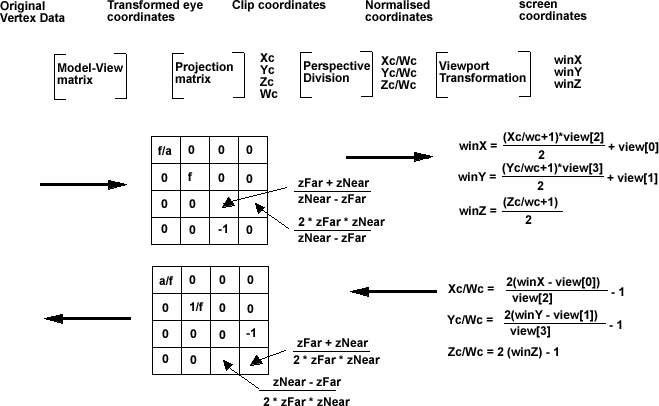
So, to summarize, the sequence is as follows:
| Model-View matrix |
[x,y,z,1] |
| Projection matrix |
[x,y,z,w] |
| Perspective division |
[x/w,y/w,z/w,1] |
| Viewport Transformation |
[u,v] |
This is all based on projective geometry which is explained on this page.
Object coordinates
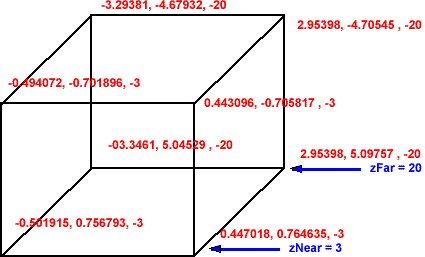
Points in 3D space are represented by 3 numbers represented by its position
in the x, y and z planes.
Normalized coordinates - frustum projection
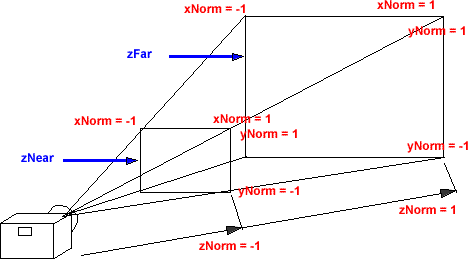
In order to represent this on a 2D screen we need to define a projection. A
frustum projection shows an object, which is closer to the camera as larger
than an object which is further away. To do this, the x and y coordinates are
scaled by an amount inversely proportional to the position in the z dimension.
Screen coordinates - frustum projection
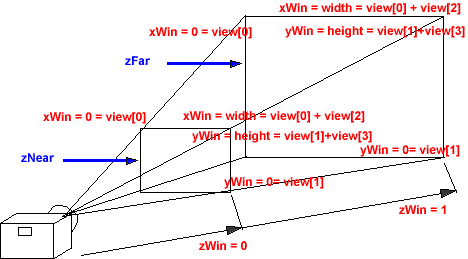
The viewport transformation scales and shifts the normalised coordinates to
fit the size of the screen.
Pipeline
The rendering pipeline takes the model data and renders it on the screen. This
is done partly by software and partly by hardware, the boundary between these
depends on what graphics card and operating system that you are using.
As shown in the diagrams above, in a frustum projection, the x and y coordinates
are scaled by an amount inversely proportional to the position in the z dimension.
A 3x3 matrix cannot represent such a transformation, so in the pipeline an additional
variable 'w' is added to each coordinate. This is a scaling value, used to scale
the x,y and z values depending on the inverse of its distance from the camera.
To do this, the matrices are increased to 4x4 to include this scaling value.
Projection Matrix
fd=1/Math::Tan(fovY/2);
aspect = ((double)Width/(double)(Height-30));
example (width=258 height=440) Aspect=0.629268
FD/aspect=5.93077841512884
FD=3.73205080756888
projection->m00 = FD/aspect;
projection->m01 = 0;
projection->m02 = 0;
projection->m03 = 0;
projection->m10 = 0;
projection->m11 = FD;
projection->m12 = 0;
projection->m13 = 0;
projection->m20 = 0;
projection->m21 = 0;
projection->m22 = (zFar + zNear)/(zFar - zNear);
projection->m23 = -1;
projection->m30 = 0;
projection->m31 = 0;
projection->m32 = (2 * zFar * zNear)/(zFar - zNear);
projection->m33 = 0;
Inverse Projection Matrix
mi00 = - FD*m23*m32 / det = aspect/FD
in example above = 0.16861193084690149207499690607832
mi01 = 0
mi02 = 0
mi03 = 0
mi10 = 0
mi11 = - FD/aspect*m23*m32 /det = 1/FD
in example above = 0.26794919243112251215656695782073
mi12 = 0
mi13 = 0
mi20 = 0
mi21 = 0
mi22 = 0
mi23 = - FD/aspect*FD*m23/det = 1/m32 = (zNear-zFar)/(2 * zFar * zNear)
assuming zFar = -20 and zNear=-3 then m23 = 17/(2 * 20 * 3) =0.141666667
mi30 = 0
mi31 = 0
mi32 = m02*m11*m30 - m01*m12*m30 - m02*m10*m31 + m00*m12*m31 + m01*m10*m32 -
m00*m11*m32;
= - m00*m11*m32;
= - FD/aspect*FD*m32/det
= 1/m23
= -1
mi33 = + FD/aspect*FD*m22/det = -m22/(m23 * m32) = m22/m32 = (zFar+zNear) /
(2*zFar*zNear)
assuming zFar = -20 and zNear=-3 then m33 = -23 / (2*20*3) = -23/120 = 0.19166667
det= m03 * m12 * m21 * m30-m02 * m13 * m21 * m30-m03 * m11 * m22 * m30+m01 *
m13 * m22 * m30+
m02 * m11 * m23 * m30-m01 * m12 * m23 * m30-m03 * m12 * m20 * m31+m02 * m13
* m20 * m31+
m03 * m10 * m22 * m31-m00 * m13 * m22 * m31-m02 * m10 * m23 * m31+m00 * m12
* m23 * m31+
m03 * m11 * m20 * m32-m01 * m13 * m20 * m32-m03 * m10 * m21 * m32+m00 * m13
* m21 * m32+
m01 * m10 * m23 * m32-m00 * m11 * m23 * m32-m02 * m11 * m20 * m33+m01 * m12
* m20 * m33+
m02 * m10 * m21 * m33-m00 * m12 * m21 * m33-m01 * m10 * m22 * m33+m00 * m11
* m22 * m33;
= -m00 * m11 * m23 * m32;
=FD/aspect * FD * m23 * m32
[0.168611930846902 0 0 0]
[0 0.267949192431123 0 0]
[0 0 0 0.141666666666667]
[0 0 -1 0.191666666666667]
Picking
How to do reverse process, select 3d object from 2d position on screen,

- generate the ray
- traverse the scenegraph to pick the nearest object along the scenegraph
how to pick the nearest
object
|
metadata block
|
|
|
| see also: |
|
| Correspondence about this page |
|
|
Book Shop - Further reading.
Where I can, I have put links to Amazon for books that are relevant to
the subject, click on the appropriate country flag to get more details
of the book or to buy it from them.
|
If you are doing a lot of OpenGL programming, and you can afford it. It really
helps (in fact its almost essential) to have these 2 books at hand. The programming
guide (red cover) explains the theory and the reference manual (blue cover)
has complete definitions for all the API calls.
|
|
Commercial Software Shop
Where I can, I have put links to Amazon for commercial software, not
directly related to this site, but related to the subject being discussed,
click on the appropriate country flag to get more details of the software
or to buy it from them.
|
|
|
Can this page be improved?
Please send me any improvements to
here. I would appreciate ideas to make the pages more useful including
error correction, ideas for new pages, improvements to wording. It helps
if you quote the full URL of the page.
|
|
|
progam
I am working on a project which uses these principles, if you would like
to help me with this you are welcome to join in, here:
|
http://sourceforge.net/projects/mjbworld/
|
This site may have errors. Don't use for critical systems.